Category Archives: Assessment

“Micro-Innovations” in Assessment for Specific Subjects, Levels, and Contexts: AI, New Technologies and the Future of Assessment (Part 4) 

With so much changing so fast, what new developments in assessment at the classroom and school level bear watching? In the final post in this four-part series, Adelaida Kim and Thomas Hatch provide examples of “micro-innovations” in assessment that leverage AI and new technologies to support the development of specific skills and abilities in different subjects and levels. Part one provided an overview of some uses of AI in both large-scale standardized tests and classroom-based assessments. Part two described some of the new platforms, apps, and tools that teachers can use to create, analyze, and score assessments, particularly those that support more student-centered learning. Part three took a deeper look at and compared the strengths and weaknesses of the assessment capabilities of selected teacher-directed AI platforms, EdTech tools, and AI “assistants” with multimodal capabilities. For related stories on AI and education, see: Can AI “ignite the mind and heart”? Stability & change in the education system in China (Part 3); Scanning the global headlines for recent news on AI, schools, and education; AI, Cellphones, Literacy, Students’ Mental Health, Political Turmoil and More: Scanning the Headlines for the Top Education Stories for 2025.

+++++++++++++++

Fueled by AI and new technologies, innovations in assessment are emerging and quickly finding their way into classrooms, educational platforms, and large-scale tests. These include a wide range of digital tools that purport to help educators improve assessments across subjects and levels (see, for example, NWEA’s 75 digital learning tools and apps that teachers can use to support formative assessment and instruction in the classroom). Beyond these generic tools, however,  a number of “micro-innovations” are demonstrating how new assessments can support the development of specific skills and knowledge in different subjects and at different levels. The effectiveness of most of these new assessment tools and approaches has not yet been established, but a review of recent articles from major education news outlets provides a sense of what’s already out there. The book Artificial Intelligence and Education in the Global South also provides a glimpse of AI’s role in assessments across different subjects and contexts in developing countries. 

A game-based approach for assessing linguistic skills among students with dyslexia

Dysolve is an AI-based educational platform developed to support learners with dyslexia and related language-processing differences through adaptive, game-based activities rather than traditional static assessments or interventions. The platform provides users with customized interactive verbal games; as students play, the program analyzes responses in real time and generates new games that focus on specific cognitive and linguistic skills that need further development. To increase novelty, games are only used once and then disappear. Preliminary findings indicate potential improvements in reading outcomes for some elementary-aged learners, 

Read-alouds and speech recognition for assessing reading abilities 

Conventional early-grade reading assessments have relied on training educators to administer one-on-one tests, but this individualized approach makes large-scale testing expensive and demanding. Newer AI-based approaches, combined with developments in speech recognition technologies, however, can be administered to many students at once while still gathering detailed information about phonemic awareness, decoding ability, and reading fluency. For example, SoapBox Labs has developed speech-recognition technology designed to interpret children’s voices and convert oral reading or spoken responses into data that can inform assessment. This approach seeks to embed assessment within routine classroom activities, such as having early elementary students read aloud while automated systems transcribe speech, analyze fluency or comprehension indicators, and generate information that may guide instructional decisions. Following its acquisition by Curriculum Associates, this technology has been incorporated into existing educational programs, including i-Ready, reflecting broader efforts to integrate voice-based analytics into literacy instruction. 

Among a slew of related platforms and tools, Amira fuses voice-based AI into reading activities with a chatbot or “reading assistant.” Amira’s reading assistant begins by observing a student read for six to ten minutes and gauges the child’s ability to name letters, sound out words and combine them into phrases and sentences. From that initial screening, Amira can gather information to spot signs of dyslexia, assess phonics mastery, estimate a student’s vocabulary size, and get a handle on decoding skills and comprehension levels. Then, the program reports findings to a teacher to support differentiated instruction, estimating the literacy levels and needs of individual students.
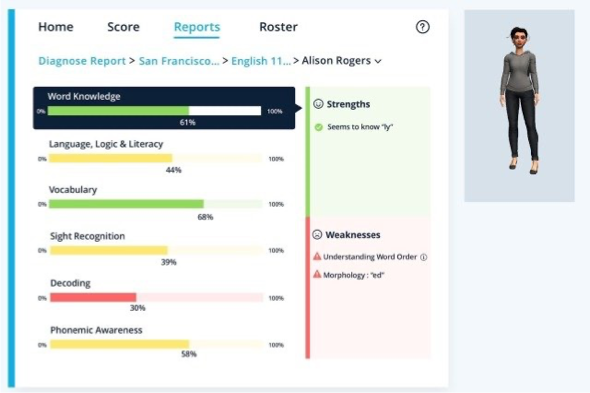
Amira’s “reading assistant” “observes” a student read to gauge key elements of reading ability, The74

Along with the Rapid Online Assessment of Reading (ROAR) and several other edtech-enabled approaches, Amira has been approved by states such as California and New Jersey to facilitate early screening of students for difficulties in learning to read. Some initial evidence suggests these digital tools can improve reading outcomes for some students, but with some limits.  According to Ran Liu, chief AI scientist at Amira, “We’ve learned that around 25-30-minute sessions are where we see a ceiling effect.” Although Amira can also be used with Spanish-speaking students, all of these tools need to be adapted for other languages, and critical concerns include how well they will work for students with accents or speech-related challenges. 

Automated Early Literacy Assessment in Low-Resource Languages

Although many of the most well-known AI tools focus almost exclusively on English, training AI models on locally collected speech data also enables assessments in a wide range of languages, including those that are often underrepresented in educational technology systems. To that end, the EGRA-AI project in South Africa explores whether speech-recognition models can automatically assess children’s early reading abilities in African languages such as Sepedi and isiXhosa. The system records children reading letters or words aloud and uses machine learning models to determine whether their pronunciation is correct.

AI-Supported Feedback on Student Writing in contexts with limited internet access

In addition to AI-enabled platforms like Classtime and Brisk that provide automated feedback on student performance across many subjects and levels, some tools are being designed specifically to meet the needs of educators working in areas with limited digital infrastructure and large class sizes. For example, in the AIED Unplugged initiative in Brazil, teachers photograph students’ handwritten essays and upload the images to an AI system that evaluates them using a predefined rubric. The system converts handwriting using optical character recognition and provides rubric-aligned feedback on organization, grammar, and argumentation. The system is designed for teachers to review the feedback before returning it to students. 

A game-based approach to assessment in physics

Although many digital tools focus on foundational skills like reading, NWEA (Northwest Evaluation Association) has been working with the game maker Filament Games to develop a digital assessment that examines middle school students’ understanding of Newton’s Second Law of Motion. The assessment uses a collaborative 3D simulation in which pairs of students adjust variables, such as mass and force, to synchronize virtual vehicles, enabling the system to capture evidence of scientific reasoning during problem-solving. The assessment – Distance Dash – is a game-based, digital assessment delivered through the Roblox platform. In the game, “students pick a skateboard, a bike, a grocery cart, or an automobile, load each with different items, then collaboratively fine-tune the forces placed on them. The whole time, the game covertly measures several objectives, including whether students understand the principles of acceleration and how to apply optimal force.” The project is part of broader efforts to explore game-based environments as potential spaces for classroom assessment, while also raising questions about how such platforms shape collaboration, engagement, and the measurement of student learning.

A still image from Distance Dash on Roblox. (NWEA), The74

AI-Supported Preparation for High-Stakes Examinations

In Liberia, AI-driven chatbots are being piloted to help secondary school students prepare specifically for the West African Examinations Council (WAEC) exams. These chatbots simulate exam-style questions, provide explanations of correct answers, and offer targeted practice in areas where students struggle. Although they are primarily designed as learning tools, such systems implicitly rely on continuous formative assessment: the chatbot must infer a student’s level of understanding in order to generate appropriate questions and feedback.  

AI-Based Measurement of Collaborative Problem-Solving

AI is also being used to measure competencies that are difficult to assess through traditional tests. In the ACTNext “Crisis in Space” pilot, students work together in a multiplayer game environment to solve a simulated emergency scenario. AI systems analyze students’ dialogue and interactions—such as turn-taking, information sharing, and problem-solving strategies—to assess collaborative skills. Rather than evaluating a single correct answer, the system analyzes patterns in communication and teamwork. This approach reflects broader efforts in educational measurement to assess 21st-century competencies, including collaboration and collective problem-solving, using AI-driven analysis of behavioral data

Oral assessments in higher education.

With students’ use of AI tools raising concerns about cheating, many educators are looking for alternatives to essays, research reports, and other written assessments. Those concerns, in turn, have fueled a renewed interest in oral assessments. For instance, Panos Ipeirotis, a professor at New York University’s business school, noticed that many students in his data science class were unable to discuss or defend their own written work when called upon. As Ipeirotis put it, “If you cannot defend your own work live, then the written artifact is not measuring what you think it is measuring.” 

“If you cannot defend your own work live, then the written artifact is not measuring what you think it is measuring.” – Panos Ipeirotis

In response, he and a colleague built an “AI examiner” using conversational speech technology that probed students’ thinking about their capstone projects and that could question students about one of the cases discussed in class. With a class of over 30 students, a single instructor could not conduct such individualized oral exams, but Ipeirotis’ AI agent assessed 36 students for about 25 minutes each over nine days. Ipeirotis even had ChatGPT, Claude, and Gemini score students’ responses and asked them to review the scores and generate a final grade, with Claude designated as the “chair” of the panel to synthesize the decisions. Student reactions were mixed — most found the format more stressful than traditional written tests, but many also acknowledged it was a more authentic measure of their understanding 

Large-scale developments in assessment that might eventually be used at the classroom and school level

Efforts to develop digital and multimodal assessment tasks for large-scale assessments may also provide models for how educators might assess capacities not normally measured in conventional assessments. Notably, the Program for International Student Assessment (PISA) has introduced a Creative Thinking assessment to examine the creative capacities of 15-year-old students in more than 60 countries. This assessment differs from conventional standardized measures by incorporating interactive digital tasks, including opportunities for students to produce drawings and respond to open-ended prompts with multiple possible solutions rather than a single correct answer. In addition to documenting creative expression, the assessment reflects broader efforts to capture dimensions of student learning that extend beyond strictly cognitive outcomes, such as engagement, flexibility in problem solving, and responsiveness to novel tasks. These kinds of tasks provide a model for other multi-modal assessments of competencies that may eventually find their way into tools and technologies available to educators. 

Similarly, with the concerns about the authorship of college applicants’ personal essays, tech-enabled video interviews may become a more common part of the college application process. Even before the AI boom, companies like InitialView were developing platforms that allowed students to record video interviews they could send with their applications to a number of US colleges. Particularly popular with international applicants, the platform had, by 2014, attracted over 17,000 applicants from China. In the last few years, the company has developed a related application, VIVA, in which students upload a research paper or project, and an AI agent then generates a series of questions about their project that students answer during a recorded video interview. Originally offered by Caltech to accompany research papers that some applicants submitted as application supplements, the same video-based approach could be used to support oral defenses and classroom presentations in both K-12 and higher education. 

Caltech’s application instructions & a sample image from the VIVA video interview

Questions for the future

These examples illustrate some of the ways AI and other digital tools may help educators conduct assessments tailored to specific skills, competencies, and subjects at different levels and in more- and less-developed contexts. At the same time, these examples demonstrate how quickly things are changing and how difficult it is to obtain detailed information about the effectiveness and impact of most AI-related developments. In this context, many educators and students may find themselves using these AI and technology tools without really knowing: 

  • Which of these tools is most likely to improve learning?
  • For which students?
  • Under what conditions?
  • At what cost to professional judgment, student agency, and curricular coherence?

Under these conditions, AI developers and researchers have a responsibility to work with educators to keep these critical questions at the forefront of their collective work.

The Emerging Affordances of Teacher-Directed Platforms, EdTech Tools, and Multimodal Assistants: AI, New Technologies and the Future of Assessment (Part 3)

What are the benefits and drawbacks in using different AI-powered tools for assessment? In part three of this four-part series, Philip Seyfried, Suet Cheah, Alok Sharma, and Dana Bassynbekova highlight the differences in the key features and level of teacher oversight and control that several prominent AI platforms, tools, and chatbots offer for assessment and development of student learning. Their analysis was produced as part of a project working with District 79 of the New York City Public Schools. Part one of this series provided an overview of some uses of AI in both large-scale standardized tests and classroom-based assessments. Part two described some of the new platforms, apps, and tools that teachers can use to create, analyze, and score assessments, particularly those that support more student-centered learning. Part three took a deeper look at and compared the strengths and weaknesses of the assessment capabilities of selected teacher-directed AI platforms, EdTech tools, and AI “assistants” with multimodal capabilities. In the final post in this three-part series, Adelaida Kim and Thomas Hatch provide examples of “micro-innovations” in assessment that leverage AI and new technologies to support the development of specific skills and abilities across subjects and levels. For related stories on AI and education, see: Can AI “ignite the mind and heart”? Stability & change in the education system in China (Part 3); Scanning the global headlines for recent news on AI, schools, and education; AI, Cellphones, Literacy, Students’ Mental Health, Political Turmoil and More: Scanning the Headlines for the Top Education Stories for 2025.

+++++++++++++++

Artificial intelligence (AI) is rapidly reshaping what is possible in educational settings. AI enables new pathways not only in how students learn, but in how their understanding can be demonstrated, assessed, and developed over time. But the benefits and drawbacks of AI for assessment differ substantially, depending on the affordances of different platforms and tools. Broadly, three categories of AI-powered tools differ in their key features and the degree of teacher oversight, which has important implications for assessment, particularly assessments that move beyond traditional text-based responses toward multimodal, creative, and conversational demonstrations of understanding.

  • Teacher-Directed AI Platforms: Purpose-built EdTech tools designed to put curriculum and guardrails in teachers’ hands, with visibility into student interactions
  • Creative AI Tools: Platforms that empower students to demonstrate learning through the creation of videos, presentations, podcasts, and images
  • Multimodal General AI: Large-scale AI assistants that can generate text, images, and interactive experiences, and which are increasingly finding educational applications

Comparison at a Glance

ToolTeacher SetupStudent CreationQuiz / FeedbackMultimodal OutputTranscript Access
Magic School AI
School AI
Flint AI
NotebookLM
Canva (AI)
Google Gemini
Google Gems

Note: Current capabilities as of July, 2026. “Teacher Setup” refers to the teacher’s ability to configure the AI experience before students use it. “Student Creation” refers to whether students can produce their own multimodal artifacts (images, video, slides, audio) within the tool. “Quiz / Feedback” refers to the ability to quiz or provide feedback on student work. “Transcript Access” refers specifically to the teacher’s ability to read the student’s conversation with the AI.

Teacher-Directed AI Platforms

The tools in this category have been built specifically for K–12 and higher education contexts. Their defining features are teacher control, transparency, and safety. Educators can design AI-powered activities and chatbot experiences, set parameters for student interaction, and critically review what students have said and done on the platform. These features help make these tools useful for formative assessment, differentiated practice, and the ethical deployment of AI in school settings.

Magic School AI

Magic School AI  |  Teacher-Directed AI Platform
OverviewA comprehensive AI platform for educators offering 60+ AI-powered tools, including a “Magic Student” suite that lets teachers build structured AI activities for their classrooms.
Key FeaturesTeacher-designed AI chatbots and activities; student guardrails; access to conversation transcripts; learning analytics dashboard; differentiation tools.
Assessment UseTeachers can assign AI-facilitated activities and review student interactions to assess comprehension, reasoning, and writing development.
Access ModelFree tier available; paid plans for full feature access. Widely adopted in US K–12 schools.

School AI

School AI  |  Teacher-Directed AI Platform
OverviewA student-facing AI learning environment built around “Spaces,” which are teacher-configured AI experiences with defined purposes, personas, and guardrails.
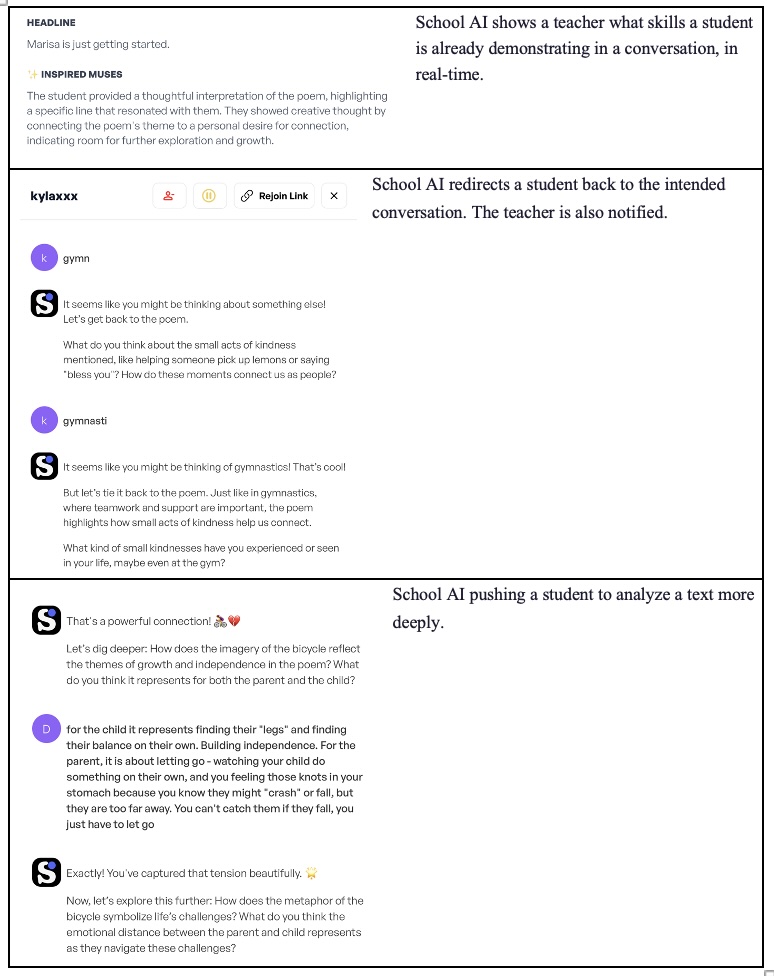
Key FeaturesCustom AI Spaces for each assignment or learning context; teacher visibility into all student-AI conversations; real-time monitoring; safety filters.
Assessment UseTeachers can use conversation data as evidence of student thinking; Spaces can be configured to ask Socratic questions rather than simply provide answers, generating richer assessment evidence.
Access ModelSchool and district licensing model. Designed to integrate into existing classroom workflows.

School AI’s “Spaces” architecture can support alternative assessment approaches. Because teachers define what the AI does and does not do within each Space, they can design experiences that elicit student thinking rather than simply complete tasks for students. The transcript visibility feature is central to its use as an assessment tool.

Flint AI

Flint AI  |  Teacher-Directed AI Platform
OverviewAn AI tutoring and classroom engagement platform that enables teachers to create custom AI tutors with specific personalities, knowledge bases, and behavioral constraints.
Key FeaturesCustom AI tutor creation; teacher monitoring of all student interactions; analytics on student engagement and learning; content guardrails; assignment integration.
Assessment UseAI tutors can be configured to probe student understanding through questioning. Teacher-facing analytics provide formative data. Conversation logs serve as qualitative assessment artifacts.
Access ModelSchool and district licensing. Offers LMS integrations.

Flint emphasizes the tutoring relationship and students receive personalized support while teachers maintain visibility and control. For assessment purposes, the combination of analytics and conversation transcripts offers a window into student thinking that traditional written assessments may not capture.

What Teacher-Directed Platforms Share

Across Magic School AI, School AI, and Flint AI, three features stand out as essential to their value for learning and assessment:

  • Teacher-designed activities and guardrails: the teacher shapes the learning experience before students ever interact with the AI
  • Conversation visibility: teachers can read what students said and how the AI responded, creating a rich record of student thinking
  • Learning analytics: aggregate and individual data surfaces patterns in student engagement and understanding

Together, these features make teacher-directed platforms particularly useful for formative and alternative assessment at this time.

Creative AI Tools

The tools in this category empower students to create multimodal products, such as videos, podcasts, slide presentations, images, and diagrams, to demonstrate their learning. Teachers can ask students to produce an explanation, a visual argument, or a narrated presentation. AI dramatically lowers the technical barrier to these forms of expression, making them accessible to more students.

NotebookLM

NotebookLM  |  Creative AI Tool (Google)
OverviewGoogle’s AI-powered research and synthesis tool that allows users to upload source documents and interact with an AI grounded in those sources. Increasingly capable of generating multimedia outputs.
Key FeaturesSource-grounded AI responses (reduce hallucination); podcast-style audio generation from documents; study guide and FAQ generation; mind map and visual summary creation; video overview generation.
Assessment UseStudents can upload a set of sources and ask NotebookLM to generate a podcast, video overview, or visual explanation of a concept, thereby creating a multimedia artifact that demonstrates synthesis and understanding. Teachers can assess the quality of the artifact as evidence of learning.
Teacher OversightNo direct teacher oversight or transcript visibility built in. Teachers assess the final product rather than the process.

One way to use Notebook-LM for assessment is to ask students to upload primary or secondary sources and then produce a NotebookLM-generated podcast or video that explains a concept, event, or argument. The quality of the output reflects the quality of the sources students selected, and the prompts they used can reveal meaningful understanding. Students then can analyze the results, identifying what AI did well and what important information and perspectives it misses. Notably, however, selecting lower quality texts and prompts may make it harder for students to demonstrate more sophisticated analyses.

Canva (with AI Tools)

Canva  |  Creative AI Tool
OverviewA widely used design platform that has integrated a suite of AI tools for image generation, photo editing, presentation creation, video production, and more.
Key FeaturesAI image generation and editing; AI-assisted slide presentation design; video creation with AI voiceover; photo background removal and editing; “Magic Write” for text generation; diagram and infographic templates.
Assessment UseStudents can edit images for a visual argument, build an AI-assisted presentation to explain a concept, create an infographic to synthesize research, or produce a short video demonstrating the process they went through. These artifacts serve as alternative assessments of understanding.
Teacher OversightNo built-in teacher monitoring of AI interaction. Assessment focuses on the finished product. Canva for Education offers classroom management features, including assignment sharing.

Canva’s value for alternative assessment lies in its accessibility and range. Students who might struggle with a traditional essay may demonstrate a more sophisticated understanding through a well-designed infographic or a narrated video. Photo-editing tasks, such as adjusting an image for a presentation, can also demonstrate visual literacy and design thinking alongside content knowledge.

Both NotebookLM and Canva shift assessment from the process of thinking to its product, which can have both benefits and drawbacks. For instance, these tools enable simultaneous assessment of content knowledge and creative and technical skills, and the reduced technical barrier means more students can demonstrate learning in ways that suit their strengths. However, teachers must develop criteria for assessing multimodal products, not just written responses. Furthermore, the artifact itself (the video, the podcast, the presentation) becomes both the assessment and the evidence of learning, but neither tool currently provides teachers with visibility into the AI interactions that produced the artifact.

Multimodal General AI

General-purpose AI assistants like Google Gemini are increasingly capable across modalities by generating text, producing images, creating video, and supporting interactive experiences. As these tools add educational features (like Google Gems), they occupy a middle ground between creative tools and teacher-directed platforms. They are powerful and flexible, but their oversight features are currently more limited than those of purpose-built EdTech platforms.

Google Gemini

Google Gemini  |  Multimodal General AI (Google)
OverviewGoogle’s flagship AI assistant, available across the Google ecosystem. Gemini is increasingly multimodal, capable of generating text, images, and video, and of reasoning across multiple formats.
Key FeaturesText generation and conversation; image generation; video generation (Veo integration); code generation; document analysis; integration with Google Workspace tools.
Assessment UseGemini can quiz students on a topic, provide feedback on submitted writing or work, and help students explore ideas through conversation. Its multimodal output capabilities allow students to create a range of artifacts.
LimitationAt this time, Gemini does not provide teachers with access to transcripts of student conversations. Assessment of AI-assisted work must rely on final products or student self-reporting.
AccessGemini Advanced is available through Google accounts with a Google One subscription. Integrated into Google Workspace for Education.

Gemini’s growing multimodal capabilities make it a versatile tool for student creation. A student might ask Gemini to generate an image illustrating a concept, then embed it in a presentation with an explanation they have written. Or they might submit a draft essay and receive detailed feedback, an experience that mirrors personalized writing conferences. However, the absence of teacher-visible transcripts is a key limitation for use in formal assessment. Teachers can assess what students produce with Gemini’s help, but not the quality of their reasoning within the conversation itself.

Google Gems

Google Gems  |  Configurable AI Agents within Gemini
OverviewGems are customizable AI personas within Google Gemini. Teachers or institutions can create Gems with specific roles (a research assistant, a writing coach, a practice quiz partner) and share them with students.
Key FeaturesCustom AI persona creation with defined roles and instructions; ability to set a specific knowledge focus; shareable with student groups; supports Socratic questioning, practice environments, and research assistance.
Assessment UseA teacher can create a Gem configured to quiz students on a specific topic, ask follow-up questions, or provide scaffolded feedback on submitted work. Students interact with a purpose-built AI experience within the broader Gemini environment.
LimitationLike Gemini generally, Gems do not currently provide teachers with access to conversation transcripts. The teacher sees neither what the students asked nor how the Gem responded.
Comparison NoteGems offer similar configurability to teacher-directed EdTech platforms (Magic School AI, School AI, Flint), but currently lack the teacher-visibility features that make those platforms most useful for assessment.

Google Gems represent an important development: a mainstream AI platform that adds teacher-configurable experiences. However, Gems’ usefulness for assessment depends on whether or not future versions add teacher visibility into student interactions.

Implications for Assessment Design

Each category of tool implies a different approach to assessment design. Understanding these distinctions helps educators choose the right tool for the right assessment purpose.

Process-Visible Assessment

When using teacher-directed platforms (Magic School AI, School AI, Flint AI), the conversation itself is an assessment artifact. Teachers can evaluate:

  • The depth and relevance of questions a student asks the AI
  • How a student responds when the AI pushes back or asks a clarifying question
  • The progression of a student’s thinking across a multi-turn conversation
  • Whether a student recognizes when the AI has made an error

This form of assessment is particularly valuable because it surfaces metacognitive processes that traditional written products often obscure.

Product-Based Assessment

When using creative tools (NotebookLM, Canva) or general AI (Gemini), assessment focuses on what the student creates. Rubrics for product-based assessment should address:

  • Accuracy and depth of content knowledge demonstrated
  • Quality of synthesis across multiple sources or ideas
  • Clarity and effectiveness of communication in the chosen medium
  • Evidence of original thinking beyond AI-generated content
  • Appropriate attribution of AI-assisted elements

Product-based AI assessment works best when teachers pair it with reflections or oral explanations, giving students the opportunity to articulate what they made and why, which provides additional assessment evidence and can help reveal when students have not thought through or critically analyzed their use of AI.

Feedback and Practice Environments

Both teacher-directed platforms and Google Gems can serve as low-stakes practice and feedback environments that provide students with iterative responses to their work without the pressure of a formal grade. These uses include:

  • Submitting a draft for AI feedback before a teacher conference
  • Practicing for a presentation by interacting with a Gem configured as an audience member
  • Working through a problem set with an AI tutor that provides hints rather than answers

In these contexts, the AI functions less as an assessment instrument and more as a rehearsal space that frees teacher time for higher-order feedback and conferring.

Looking Ahead

The landscape of AI tools in education is evolving rapidly. Several trends are worth watching:

  • Growing teacher oversight of general AI tools. Platforms like Google Gemini and its Gems feature may add transcript visibility and classroom management features as they develop education-specific versions. This would significantly expand their usefulness for assessment.
  • Richer multimodal assessment. As students gain facility with tools like NotebookLM and Canva, educators will have the opportunity to design assessments that require video explanations, well-designed presentations, or AI-assisted research products, pushing assessment beyond text-based demonstrations of knowledge.
  • The conversation as curriculum. In teacher-directed platforms, the transcript of a student’s conversation with AI is a new kind of learning record that documents not just what a student knows, but how they think. Assessment frameworks will need to evolve to make productive use of this data.
  • Questions of attribution and academic integrity. As AI becomes embedded in the creation process, assessment design must grapple with what it means to demonstrate learning when AI has contributed to the product. Clear expectations, reflection requirements, and process-visible assessment approaches all play a role.

Next week: “Micro-Innovations” in Assessment for Specific Subjects, Levels, and Contexts: AI, New Technologies and the Future of Assessment (Part 4)


Can Online Platforms and Digital Tools Support More Student-Centered Learning? AI, New Technologies and the Future of Assessment (Part 2) 

Can new developments in assessment support more student-centered learning? In the second part of this three-part series, Adelaida Kim summarizes how AI and other technologies already offer educators new ways to generate, administer, and analyze assessments, including more student-centered and competency-based assessments. Part one provided an overview of some of the uses of AI in both large-scale tests and classroom-based assessments. Part three will compare the strengths and weaknesses of the assessment capabilities of selected teacher-directed AI platforms, EdTech tools, and AI “assistants.” Part four will provide examples of “micro-innovations” that already demonstrate how AI and new technologies can assess and support the development of specific skills and abilities across subjects and levels. For related stories on AI and education, see: Can AI “ignite the mind and heart”? Stability & change in the education system in China (Part 3); Scanning the global headlines for recent news on AI, schools, and education; AI, Cellphones, Literacy, Students’ Mental Health, Political Turmoil and More: Scanning the Headlines for the Top Education Stories for 2025.

++++++++

The rush to incorporate AI into all manner of educational platforms and products has already equipped educators with new ways to assess their students. Many of those tools support conventional tests and quizzes, but some may offer educators opportunities to develop alternative assessments, including portfolios, performance tasks, evidence demonstrations, peer reviews, and self-assessments. In particular, emerging technologies, including AI, could assist teachers in generating more complex, real-world tasks, facilitate data collection, analysis, and feedback, and perhaps foster the development and assessment of a wider range of abilities and overall well-being. Although it is too early to tell how effective many of the new developments will turn out to be, an examination of some of the news and research on assessment over the past few years points to new developments in digital platforms, digital portfolios, learning management systems, and tools for adaptive learning that all bear watching. 

New Platforms, Portfolios, Learning Management Systems, and Assessment Tools

Teachers and students in the US and around the world now have access to a host of different learning platforms. Some of those platforms include features that may help educators manage the complexity of competency-based and personalized assessment. Lift Learning, Foundry, Headrush Learning, Epiphany Learning, and Building 21 represent systems designed specifically around competencies rather than content sequences. These platforms provide structures for organizing student evidence, tracking mastery, supporting project-based learning, and facilitating personalized learning plans. These elements aim to make it easier for teachers to capture artifacts from daily classroom work, such as quick reflections, conference notes, or mini-tasks, and align them to clear performance indicators. The flexibility of these systems allows educators to support formative assessments, such as “micro-conferences,” that provide students with quick feedback and collect and analyze data teachers can use to inform instruction. 

Online platforms

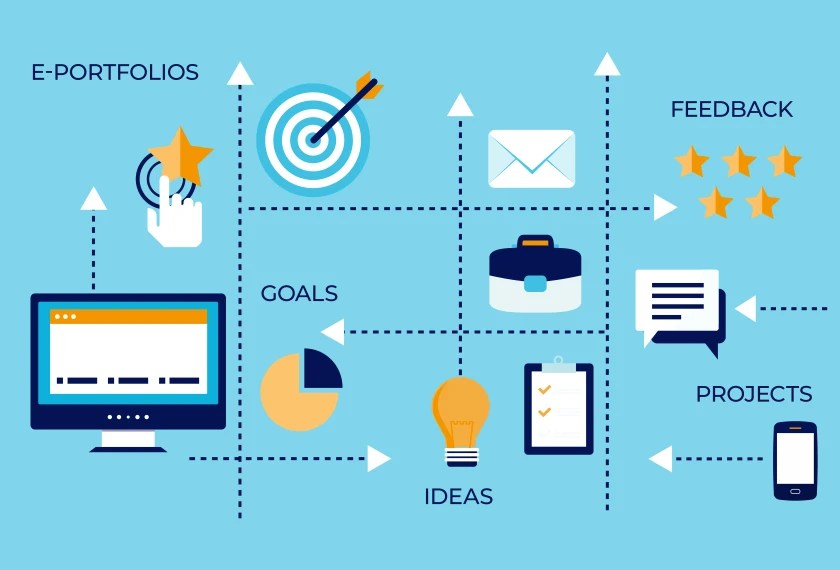
Online platforms may also provide an environment that makes it easier for teachers and students to develop digital portfolios (e-portfolios) that track the development of skills and competencies that extend far beyond those measured by conventional tests. Digital portfolios can capture multimedia materials documenting the processes, products, and performances that students complete. The hope is that by creating a living, accessible collection of work, students, parents, and future educators can all trace academic growth and evolving interests over time, making learning more transparent, equitable, and aligned with real-world competencies.

Learning management systems

Traditional learning management systems have also evolved to support alternative assessment practices. Schoology and Canvas, for example, offer features for rubric-based assessment, multimedia submissions, peer review, and mastery tracking. Meanwhile, Canvas Credentials extends this functionality through digital badges and micro-credentials, intended to indicate when students have demonstrated specific competencies by completing specific activities or producing particular products. These environments aim to provide teachers with an easy way to access new assessment tools, allowing them to integrate tools such as exit tickets, short video explanations, iterative revisions, or authentic performance tasks into familiar LMS workflows.

Platforms for “real-world” skills

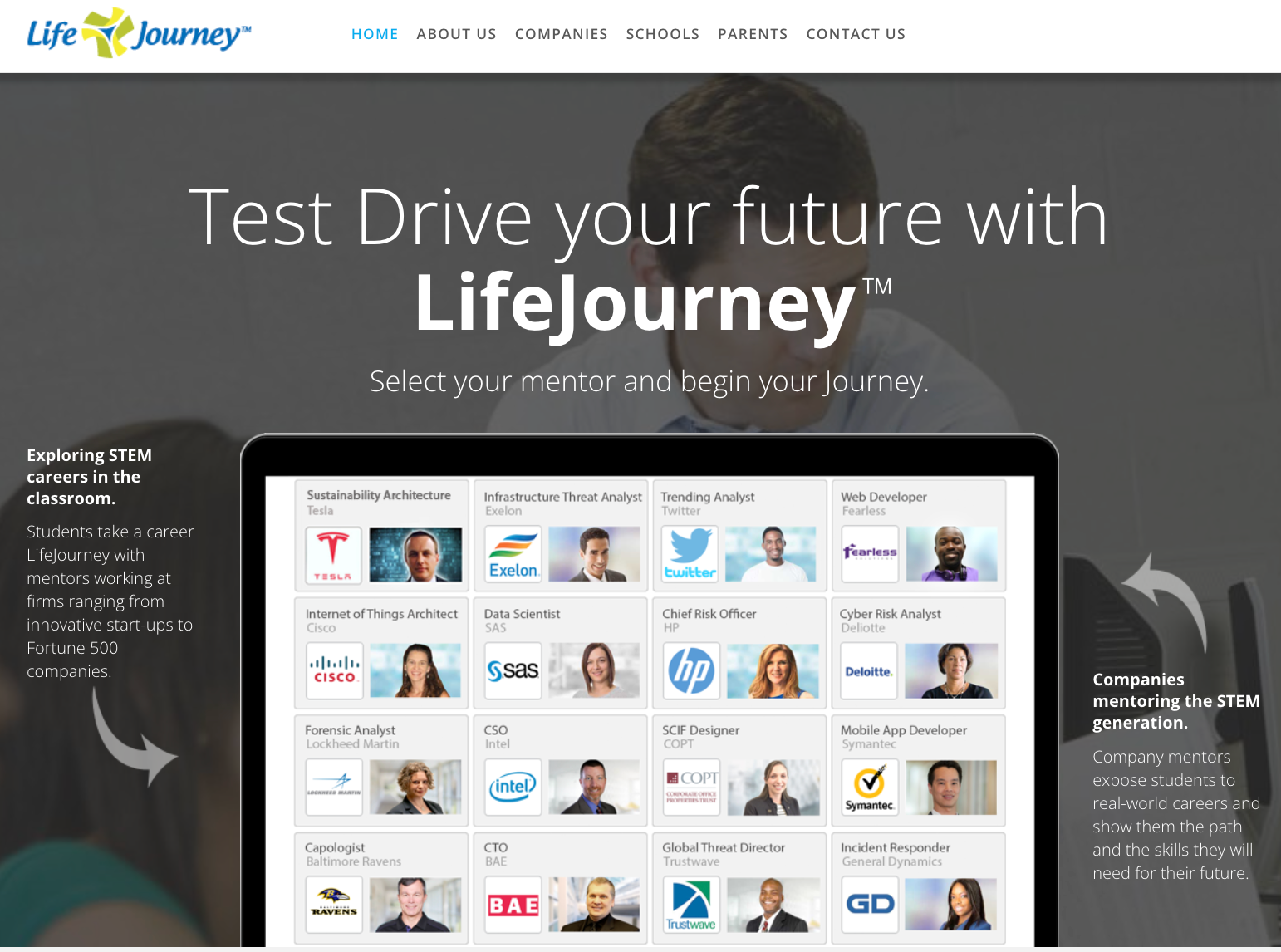
Another emerging category includes tools that help bridge classroom learning with real-world skills and career pathways. Territorium, LifeJourney, and Lightcast help schools align student assessments with employability skills and labor-market data. These platforms support a broader vision of alternative assessment: one that recognizes not only classroom competencies but also skills demonstrated in internships, co-ops, community experiences, or extracurricular learning. By mapping student evidence to industry-recognized competencies, these tools help teachers and schools emphasize authentic tasks and support the development of abilities that go beyond conventional academic tasks. 

LifeJourney Homepage showcasing mentors from various industries

Adaptive learning environments

New developments are also supporting the kind of adaptive learning and personalized assessment environments that many hope will make it possible to individualize and differentiate instruction more effectively than in the past. Area9 Lyceum, for example, uses adaptive algorithms to provide continuous formative checks and individualized learning pathways. In these contexts, students can receive real-time feedback, progress through dynamic question pathways, and engage in small-scale, personalized tasks that adjust to their performance.  Similarly, some programs, such as Learn Everywhere, expand the boundaries of where assessment can occur. Allowing students to earn competency-based credit for learning outside the traditional classroom encourages schools to adopt flexible, evidence-driven assessment models. In this approach, teachers use short reflections, artifact documentation, and performance checkpoints to verify learning in diverse settings.

Tools that support multilingual learning and multimodal assessment

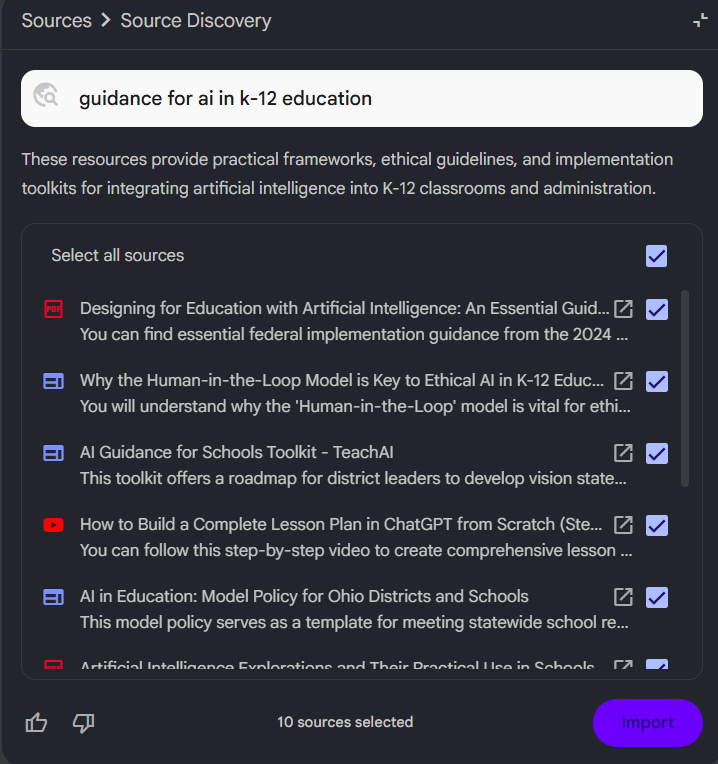
To extend the power of this support for alternative assessments, other new tools like Flint AI and School AI can help educators to create assessments that support multilingual learners. These tools enable students to read and respond to prompts, activities, and feedback in different languages. These tools can be particularly useful in subjects that focus on knowledge acquisition, critical thinking, and deeper learning – rather than simply on learning English or another non-native language. In addition, platforms like Canva and Notebook LM increasingly offer opportunities to create and analyze assessments in multiple modalities. These platforms enable students to demonstrate their learning through video-based presentations, audio podcasts, and graphic descriptions, providing windows into their thinking that conventional written responses cannot offer. Again, these alternative formats can be especially useful when students are still developing their capacities to express themselves in writing or in a non-native language. 

Notebook LLM using multiple sources to create assessments such as flashcards, quizzes, and student patterns. Ditch That Textbook, 2026

Implications? 

All these developments are creating a new ecosystem for learning and assessment. The hope is that these new tools and platforms will reduce the burden on teachers, increase transparency for students, and support richer, more authentic, and more personalized demonstrations of learning. However, if the past is any guide, these new developments may be more likely to reinforce conventional testing and instruction than to lead to an immediate revolution. An account of the remarks of Larry Cuban, author of books like Oversold and Underused: Computers in the Classroom, to Google engineers put it this way: “AI will not force educators to rethink how teachers teach, and students learn. Instead, teachers will simply adapt AI to fit the ‘contours’ of their classrooms, keeping it on the periphery of their teaching repertoire.” 

Platforms like Kahoot!, Wayground, Blooket, Gimkit, Quizlet, Formative, Mentimeter, and Plickers can make it easy for teachers to quickly generate formative assessments that students find engaging and that provide frequent information on what students are and are not learning. At the same time, those tools are much better for creating tests and quizzes that measure recall and basic skills than for assessing deeper learning. As with all new technologies, issues of implementation, bias, equity, safety, and effectiveness must be addressed. So far, surveys suggest that the use of AI is growing at a pace that outstrips evidence of its effectiveness and efforts to produce guidelines to support ethical, equitable, and safe use. As a report from Milken Institute published at the end of 2025  indicated, 60% of schools and districts in the US had no guidance on AI use at all, with decisions about how to use AI left largely up to individual teachers.  Under these conditions, concerns about AI among educators, parents, and even students are growing, leaving open a critical question: Can concerns about the use of AI and other new technologies for assessment be addressed as they become ubiquitous? 

Next week:  The Emerging Affordances of Teacher-Directed Platforms, EdTech Tools, and Multimodal Assistants: AI, New Technologies and the Future of Assessment (Part 3)